30-day free trialExpert-guided setup included(929) 560-4499

Purpose-built outcomes

Control the work that generic accounting software leaves to spreadsheets.

01

Prepare closings faster

Extract proposed payees and amounts from the source statement, then review them side by side.

02

Validate before approval

Compare proposed disbursements with collected funds available for the client matter.

03

Preserve the closing record

Keep the statement, review, checks, ledger entries, and reconciliation evidence together.

Book a Demo

How the workflow fits

From source activity to a balanced answer.

FIDGARD keeps the matter, funds check, approval, accounting entry, and reconciliation evidence connected.

01

Upload the source

Begin with the closing statement rather than retyping each instruction.

02

Review the draft

Verify payees, amounts, matters, and payment details against the source.

03

Confirm available funds

Account for pending payments and uncleared deposits before approval.

04

Print and record

Prepare checks, update the matter ledger, and align QuickBooks records.

05

Reconcile

Compare the bank, trust liability, and client-ledger totals.

Inside FIDGARD

See the records behind your closing workflow.

Existing FIDGARD product screens with fictional demonstration data. Your team reviews the records and makes the decisions.
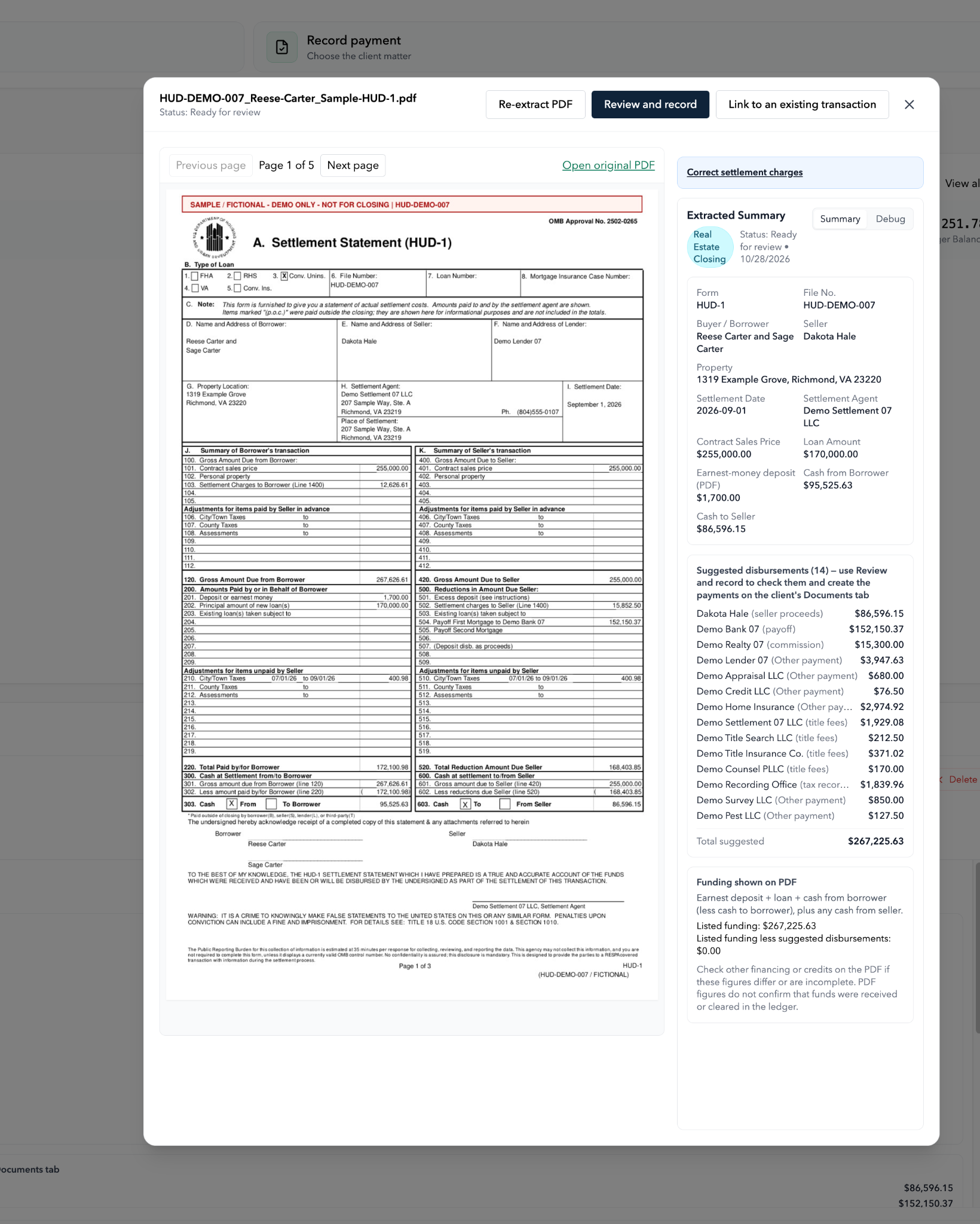
FIDGARD fictional HUD-DEMO-007 PDF beside extracted closing details, fourteen suggested disbursements and a matching PDF funding comparison
A real demo closing, with the source and review side by side.
Actual product capture using a clearly marked fictional HUD-1. Review the source PDF, extracted closing details and proposed disbursements together. Matching PDF totals do not confirm that funds were received or cleared. This screen is ready for review, not a completed payment. Select to enlarge.
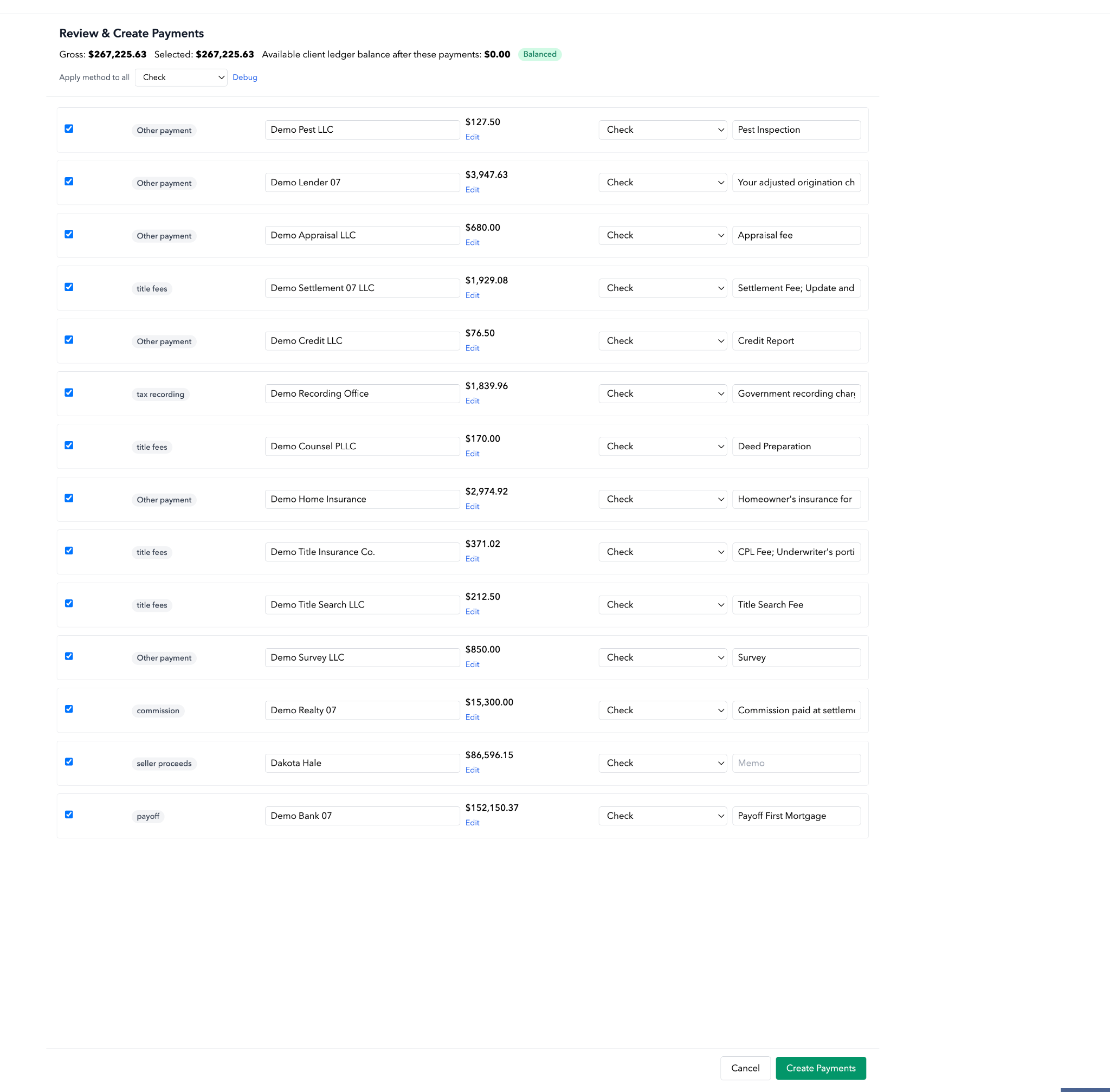
FIDGARD fictional HUD-DEMO-007 Review and Create Payments screen with fourteen selected payees, matching selected and gross totals, and a Create Payments button not yet submitted
Next: review payees, amounts and payment methods before creating payments.
The same fictional demo closing, at the Review & Create Payments step. The screen shows selected payments and the projected client-ledger balance after those payments. Create Payments has not yet been submitted in this view; it does not confirm payments were created, sent or cleared by a bank. Select to enlarge.
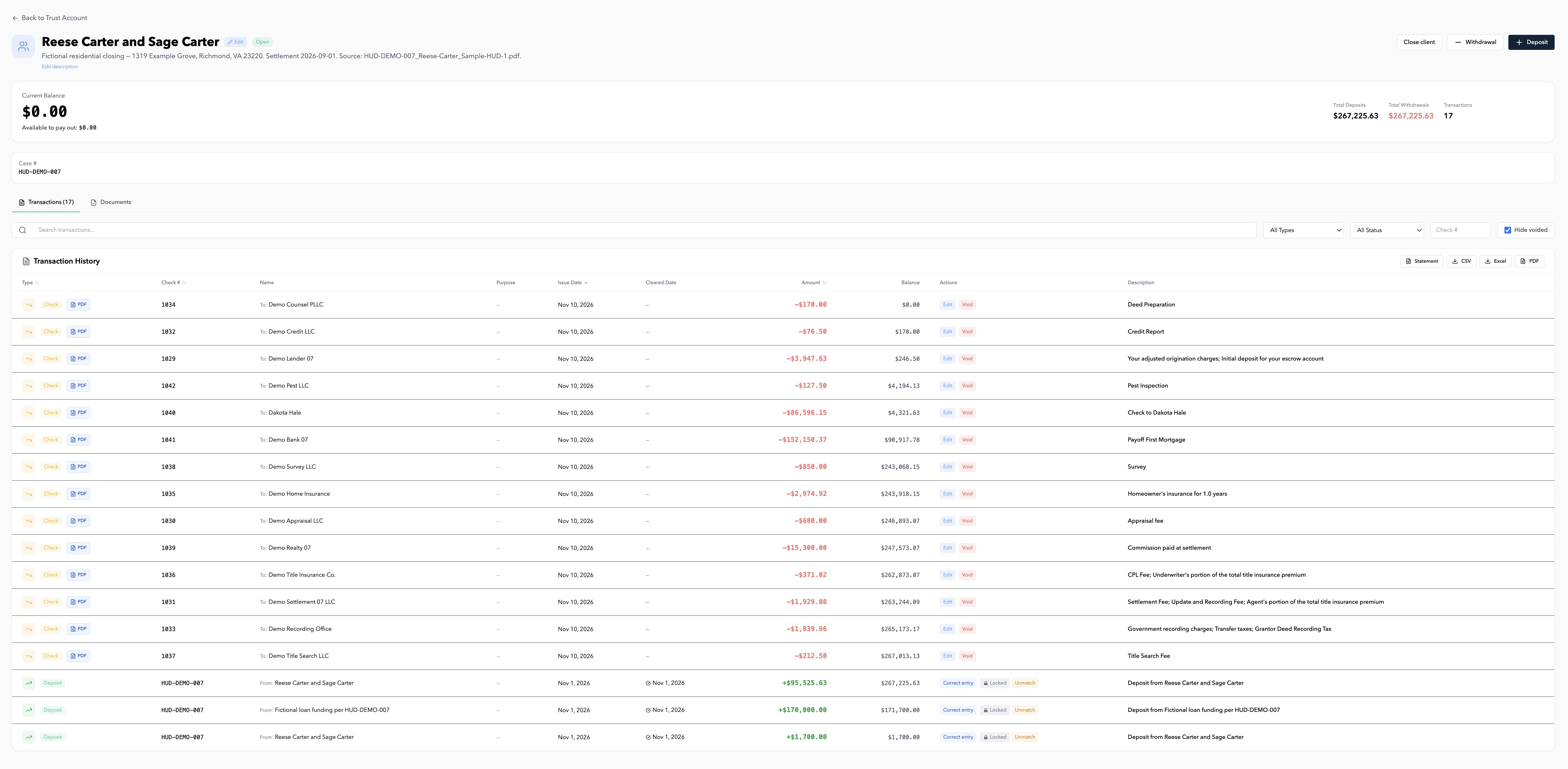
Actual FIDGARD HUD-DEMO-007 fictional client ledger showing all 17 transactions, $267,225.63 in deposits and withdrawals, and a zero ending balance
Open the client ledger and follow every recorded transaction.
All 17 transactions, including 14 draft checks, for the same fictional closing: $267,225.63 in deposits, $267,225.63 in withdrawals, and a $0.00 ending ledger balance. Draft checks are not proof of payment or bank clearing. Select to enlarge.
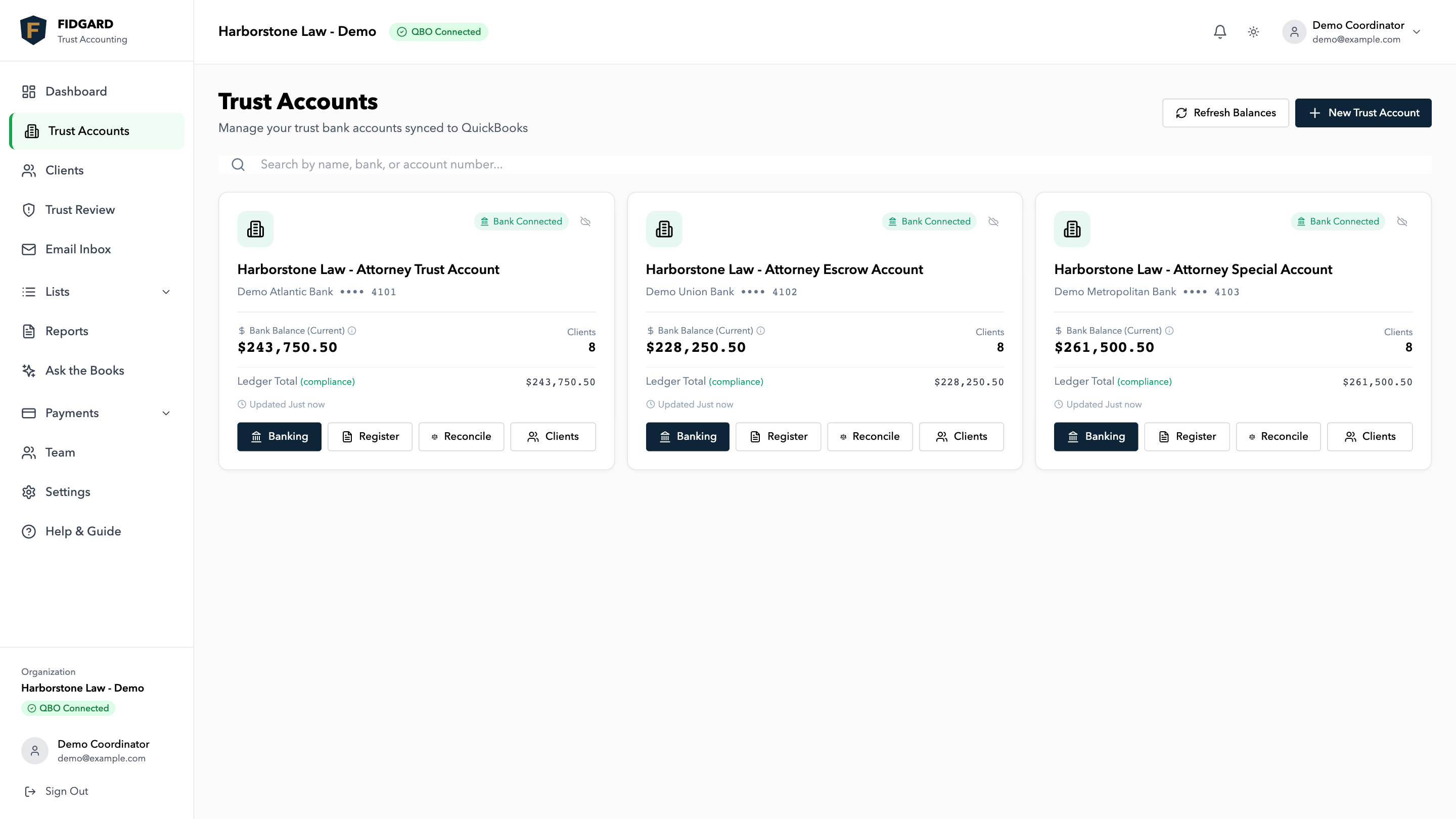
FIDGARD trust-account overview with fictional bank and matter-ledger balances
Trust-account overview: review bank, book and client-ledger totals. Fictional demonstration data. Select to enlarge.
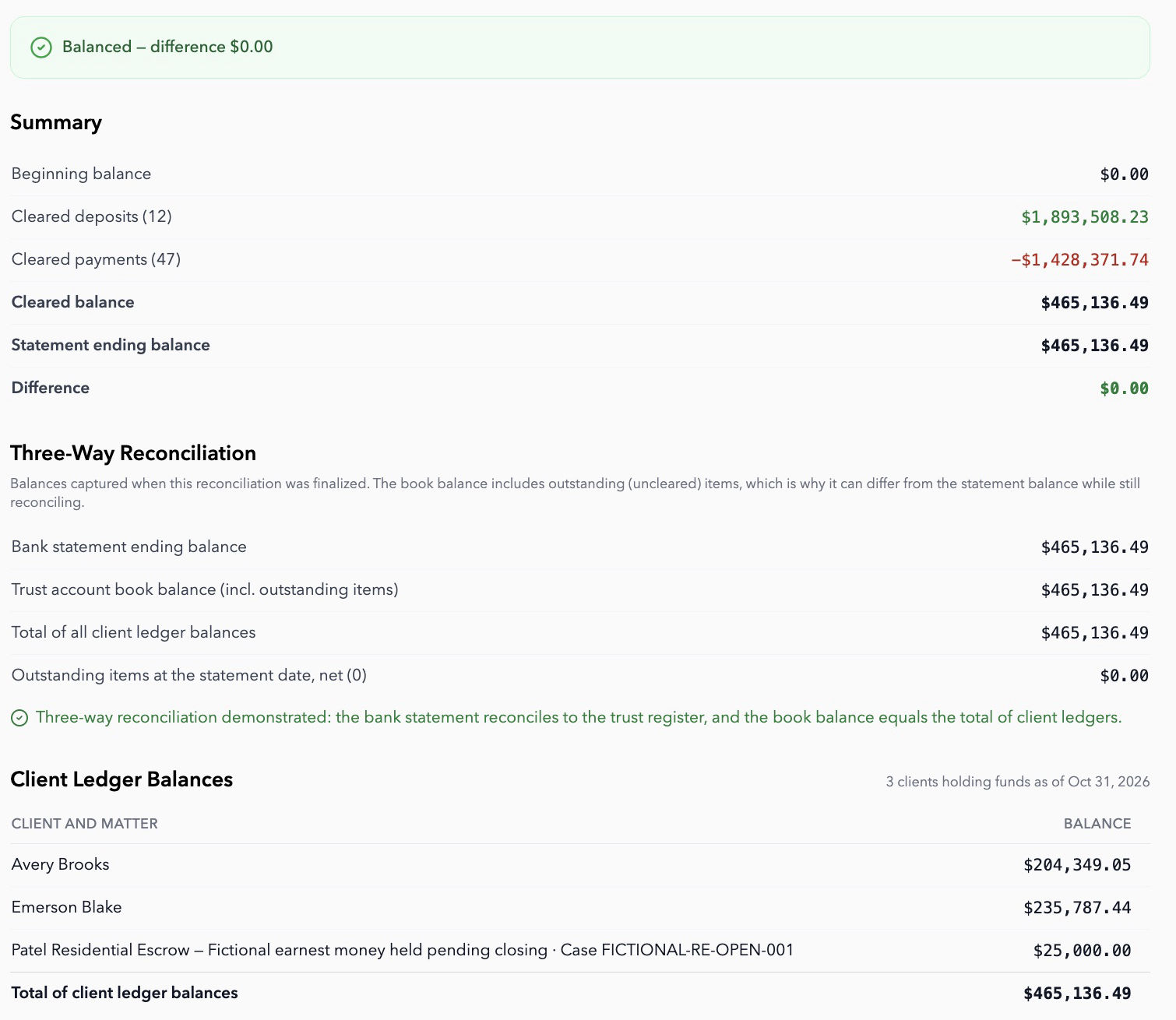
Actual October 2026 FIDGARD demo reconciliation with matching $465,136.49 balances
Separate Real Estate demo reconciliation, October 1–31, 2026: bank, book and client-ledger totals each $465,136.49; difference $0.00. This account-period example is separate from the individual matters shown above. Fictional demonstration data. Select to enlarge.

30-second product tour

A quick look at FIDGARD.

This is the general product tour, not a practice-specific walkthrough. Book a demo to review your firm’s workflow.

Book a Demo

A focused control layer

Keep your closing team’s current systems.

FIDGARD does not ask your firm to replace its bank, QuickBooks, practice-management platform, or accounting relationship. It adds the controls and matter-level records needed around the movement of client funds.

  • Keep your firm-controlled bank accounts
  • Keep QuickBooks as the general ledger
  • Keep your practice-management platform
  • Keep your internal or outside accountant involved
Review security and data handling →

Low-risk next step

Start with one account and one clear success test.

A guided pilot can validate beginning balances, run alongside your current process, and complete a first three-way reconciliation before broader adoption.

Book a DemoCall (929) 560-4499

See your workflow in FIDGARD

Book your 20-minute demo.

We will focus on for new york real estate attorneys.. Get a guided 30-day pilot, then continue for $199/month. AI closing processing costs $3 per closing.

FIDGARD is $199/month after a free 30-day guided pilot. AI closing review costs $3 per closing statement PDF processed. You only pay for AI processing when you use it. Multiple trust accounts are scoped during your demo.

Your request goes directly to FIDGARD. We will follow up to arrange a time.